Find a book

| What you see | What it does |
|---|---|
| All | Every book on the shelf, in title order. |
| Series | Series names. This picture shows Series selected. |
| Authors | One group for each author. |
| Narrators | One group for each narrator. |
| Listening | Played past about 10 seconds, and not finished. |
| Finished | Played through to the end. |
| Not started | Still at the beginning. |
The buttons under the top row are the shelf. The list on the left changes with the button you press. A long title wraps onto another line, so the right side of the window can stay on the screen.
The search box on the top row looks through title, author, series, and narrator. It narrows whichever shelf you are on.
All, Listening, Finished, and Not started
All is every book on the shelf, in title order. Listening is books you have played past about 10 seconds and have not finished. Not started is books still at the beginning, including a book you only sampled for a few seconds. Finished is books that played through to the end.
Under each title, the gold line tells you where that book stands:
| Gold line | What it means |
|---|---|
| Not on disk | You purchased this book, and the audio is not in the folder yet. Open it and press Download this book. |
| Catalog | This title is in the Audible library, and the audio is not in the folder yet. Open it and press Download this book. |
| Not started | The audio is here, and the clock is still at the start. |
| A percent and a time | How far you are, and the clock position. |
| Finished | You reached the end. |
Series
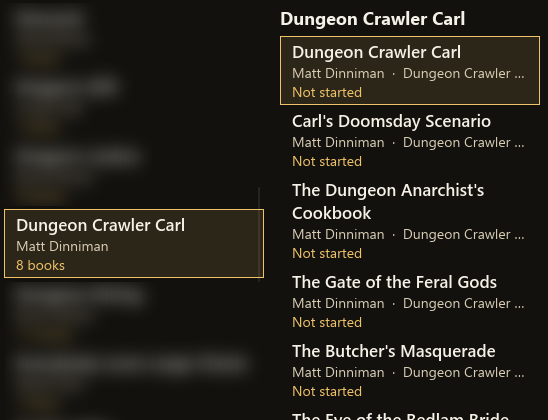
The card on the left is one series: the name, the author, and a count such as 8 books. The list on the right is the books in that series. The gold line under each title is where that book stands. In this picture every one says Not started. Click a title to select it. The selected title has a gold frame. Double-click a title to play it.
Press Series. The left list becomes series names, such as Harry Potter. A book with no series name is gathered under No series. The gold line under a series name is a count, such as "7 books", or "2 of 5 on disk" when some volumes are still waiting to download.
Click a series name. The books in that series stay in their own list. Click a title there. The title is highlighted, the list stays so you can go on to the next book, and the cover and details open beside the list. Double-click a title to play it from the saved place, or from the beginning if you have not started it. The line under the player buttons says the book opened, or that it is playing. If you have not chosen a series yet, the right side says to choose one on the left. If you have not chosen a title yet, it says to click one.
On a book's details, a series name in gold is a link. Click it. NovelWarp switches to Series and selects that series. The volume number shown beside the name is only the volume. The click uses the series name. A dash means there is no series, and that dash is not a link.
To give a book a series, type the name and the volume number in the boxes under the bookmarks, then press Save series. Use 1 for book 1. Numbered volumes sort in order. A blank number sorts after the numbered ones. The gold series name updates when you save.
Authors and narrators
Authors groups the shelf under each author. Narrators does the same for narrators. The name is a heading. Click the book listed under it. A book with two people, separated by a comma, is listed under each of them. A book with no name in that field is listed under Unknown.
The details beside the cover
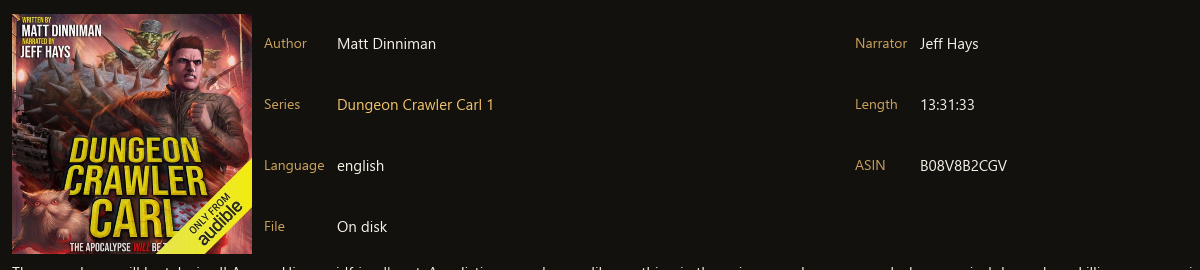
| What you see | What it does |
|---|---|
| Author | Matt Dinniman on this book. The label is gold. The name is cream. |
| Narrator | Jeff Hays on this book. |
| Series | Dungeon Crawler Carl 1. The name is gold, so it is a link back to that series. |
| Length | 13:31:33 on this book. That is the running time. |
| Language | english, as stored with the book. |
| ASIN | B08V8B2CGV on this book. Audible's id for that exact book. |
| File | On disk. It can also say Not on disk, Listening, or Finished. |
Click a book. The cover keeps its own shape. Beside it:
- Author and Narrator are the people credited on the book.
- Series is the series name and the volume. Gold means you can click it.
- Length is the running time.
- Language is the language stored with the book.
- ASIN is Audible's id for that exact book. You can leave it alone. It is there so a single-book download knows which title you mean.
- File says On disk, Not on disk, Listening, or Finished.
The paragraph under the cover is the description that came with the book. The picture above includes the first line of that description. The rest is under the cover when you scroll the book.